

Audit Log
The audit log answers the questions an auditor or a security team asks after the fact: who did it, when, what was changed, from where and whether it succeeded. It covers sign-ins, team and permission changes, security and integration settings, campaign management, exports and data deletion — whether the action came from the web app, the REST API or an AI client over MCP.
Only account administrators can open the audit log. Editors and members do not see it in the menu and are refused if they try the address, the API endpoint or the MCP tool directly.
35.1 Opening the audit log
Section titled “35.1 Opening the audit log”Open Settings → Security → Audit log. The page lists the newest entries first:
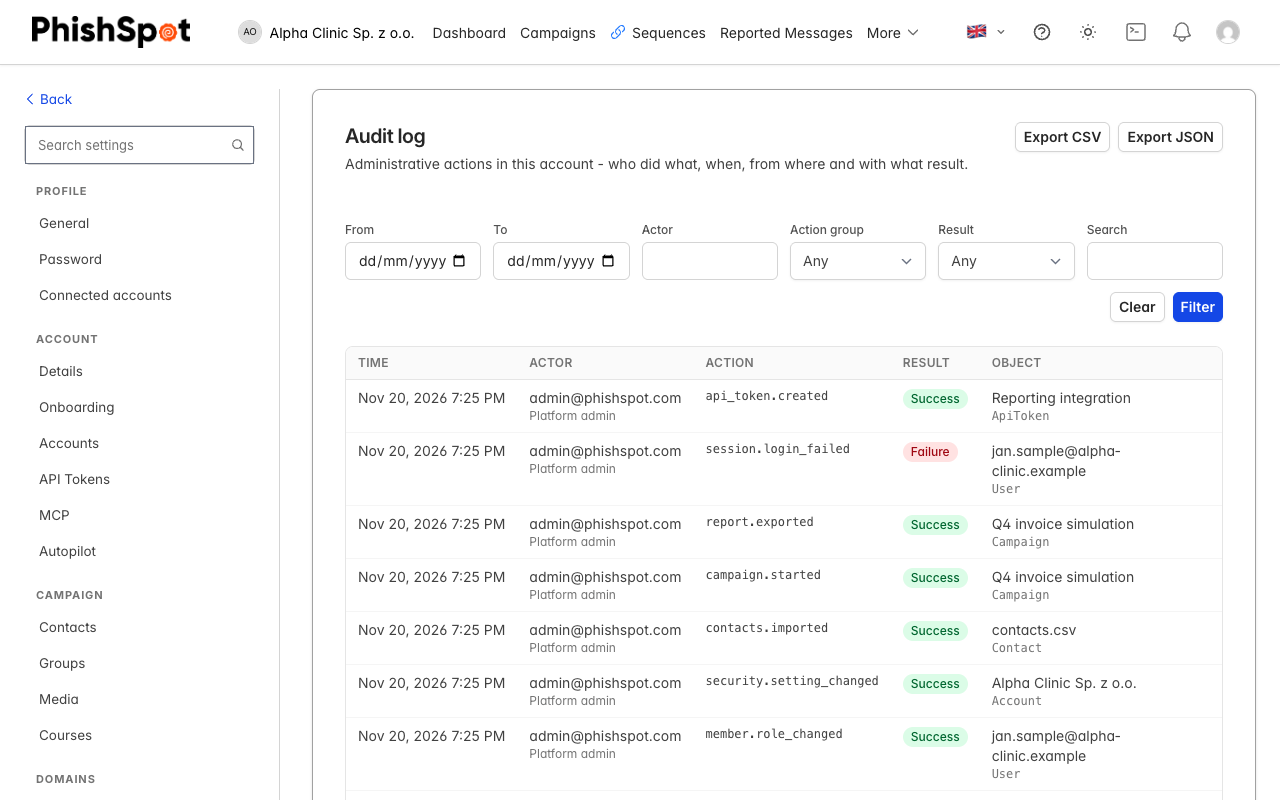
| Column | What it shows |
|---|---|
| Time | When the action happened, in your time zone. |
| Actor | Who did it: the user’s email as it was at that moment. Actions performed with an API token, by a PhishSpot platform administrator or by the system itself are labelled accordingly. |
| Action | What kind of operation it was, for example member.role_changed or campaign.started (see §35.3). |
| Result | Success or Failure. A failed sign-in is recorded as a failure. |
| Object | What was affected: its type, public identifier and name. |
| IP address | The address the request came from. |
| Channel | Where the action came from: ui (web app), api (REST API), mcp (AI client) or system (automatic, for example a scheduled campaign starting). |
Each entry also keeps the browser or client (user agent), a request identifier and a few details specific to the action, such as which setting changed or how many contacts an import added. Passwords, tokens and secrets are never written to the log.
If a PhishSpot platform administrator acts in your account while impersonating one of your users, the entry names both: the user and the administrator behind the session.
35.2 Filtering and exporting
Section titled “35.2 Filtering and exporting”Use the filters above the table to narrow the list:
- From / To — a date range.
- Actor — an email address, or part of one.
- Action group — one area, such as sign-ins, team, campaigns or exports.
- Result — success or failure only.
- Search — free text across action, actor and object.
Long lists are split into pages.
Export CSV and Export JSON download the list exactly as currently filtered, up to the 10,000 newest matching entries per file. Narrow the date range and export again if you need more. Every export of the audit log is itself recorded as data.exported, so the log also shows who took a copy.
35.3 What is recorded
Section titled “35.3 What is recorded”| Group | Actions | Recorded when |
|---|---|---|
| Sign-ins | session.login, session.login_failed, session.logout | Someone signs in, fails to sign in, or signs out. |
| Team | member.invited, member.invitation_removed, member.added, member.role_changed, member.deactivated, member.reactivated, member.removed | A person is invited, an invitation is withdrawn or used, someone joins, their role changes, their access is switched off or on, or they are removed from the account. |
| Security | security.setting_changed | A security setting changes, such as requiring two-factor authentication for everyone. |
| Account | account.updated, account.deleted | Account settings change (the entry lists which fields, not their values), or the account is deleted. |
| API tokens | api_token.created, api_token.revoked | An API token is created or revoked. |
| Integrations | integration.configured, integration.disconnected | A directory integration, report forwarding, webhook endpoint or Outlook mailbox connection is set up, changed or removed. |
| Campaigns | campaign.created, campaign.updated, campaign.scheduled, campaign.started, campaign.schedule_cancelled, campaign.paused, campaign.resumed, campaign.cancelled, campaign.completed, campaign.deleted | A campaign is created or edited, or moves through its lifecycle. |
| Contacts | contact.deleted, contacts.imported | Contacts are deleted or imported. |
| Exports | report.exported, data.exported | A campaign report, a period report, a campaign results CSV or a training certificate is downloaded (report.exported), or the audit log itself is exported (data.exported). |
| Platform administration | admin.impersonation_started, admin.impersonation_stopped | A PhishSpot platform administrator starts or stops acting as one of your users. |
| AI clients | mcp.tool_called | An AI client calls a PhishSpot tool over MCP. |
Entries about deleted contacts keep the contact’s public identifier but not their name or email, so erasing a person’s data does not leave a copy of it in the log.
35.4 Integrity and retention
Section titled “35.4 Integrity and retention”Audit entries are write-once:
- They cannot be edited or deleted — not in the web app, not through the API and not through MCP. The database itself refuses changes to stored entries.
- Tampering is detectable. Each entry carries a fingerprint computed from its content and from the entry before it, so altering or removing an entry breaks the chain.
- They are kept for at least 12 months. PhishSpot does not prune the audit log; entries stay available for as long as the account exists and are preserved even when other account data is deleted.
35.5 API, MCP and SIEM
Section titled “35.5 API, MCP and SIEM”The same entries, with the same administrator-only access, are available outside the web app:
- REST API —
GET /api/v1/audit_eventsandGET /api/v1/audit_events/:id(read-only). Filter withfilter[action],filter[action_group],filter[actor],filter[result],filter[created_after]andfilter[created_before](ISO 8601 timestamps); page withpage[number]andpage[size](200 at most). Newest entries come first; sorting, sparse fieldsets andincludeare not available on this endpoint. See Chapter 27. - MCP — the read-only tool
list_audit_eventstakes the same filters pluslimit(100 by default, 1,000 at most). See Chapter 29. - SIEM — subscribe a webhook endpoint to the
audit_event.createdevent type and PhishSpot sends each new entry to your collector as a signed delivery shortly after it is recorded. Only an account administrator can subscribe an endpoint to this event type, or change, enable, disable or delete an endpoint that is subscribed to it; other team members are refused, and they cannot open the deliveries of audit entries either. The feed is tied to the administrator who set it up: if that person stops being an active administrator of the account, deliveries stop until another administrator saves the endpoint again. See Chapter 26.
35.6 Cross-references
Section titled “35.6 Cross-references”- Chapter 12 — Team Management: roles and who counts as an account administrator.
- Chapter 14 — API Tokens: creating the token used by the API and MCP.
- Chapter 26 — Webhooks: endpoints, signatures and retries for the SIEM feed.